
Review and Reputation Management Automation for Agencies
Drew Rattray · Jun 10, 2026 · 11 min read

Quick Answer
Review and Reputation Management Automation for Agencies is software that collects, monitors, and responds to client reviews across Google, Yelp, Facebook, and industry sites without manual effort. For agencies, it means white-label dashboards, automated SMS and email review requests, AI-generated reply drafts, and sentiment alerts that scale across dozens or hundreds of client locations. Most small agencies see ratings improve within 60 to 90 days of rollout.
Key Takeaways
- Automation handles three jobs: requesting reviews, monitoring mentions, and drafting replies.
- Pricing typically runs $30 to $300 per location per month, with agency tiers starting near $200 to $500 monthly.
- AI reply drafts cut response time by roughly 70 percent while keeping a human in the loop for negative feedback [3].
- Multi-location agencies benefit most from unified dashboards that pull every review platform into one view [5].
- The biggest mistake is automating replies to negative reviews without human review.
- Free tiers exist, but they cap volume and rarely include white-label features.
- Industries with high review volume (home services, healthcare, restaurants, legal) see the fastest ROI.
What Exactly Is Review and Reputation Management Automation?
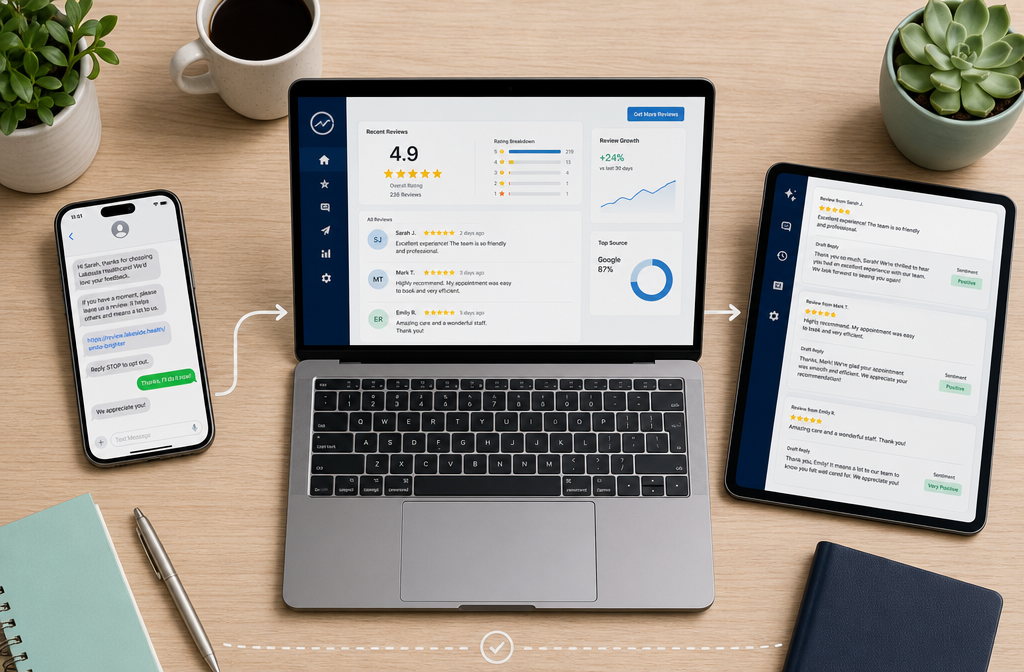
Review and Reputation Management Automation for Agencies is a system that handles the full review lifecycle automatically: asking happy clients for reviews, watching every platform for new mentions, classifying sentiment, and drafting on-brand replies. The agency keeps oversight, but the software removes the daily grind.
A typical stack includes three layers:
- Collection - SMS, email, and WhatsApp campaigns that ask for reviews at the right moment [2].
- Monitoring - Real-time tracking of Google, Yelp, Facebook, and niche directories.
- Response - AI-drafted replies that match brand voice, with flagging for sensitive cases [1][3].
For a deeper view of how this fits into a broader agency automation stack, see The 2026 Agency Guide to Automation.
How Much Does Reputation Management Software Cost for Marketing Agencies?
Most agency-tier plans run $200 to $500 per month for the base account, plus $20 to $100 per client location. Enterprise platforms with white-label dashboards and API access can reach $1,000 to $3,000 monthly.
| Tier | Typical Monthly Cost | Best For |
|---|---|---|
| Solo / Starter | $30 to $99 | Solopreneurs managing 1 to 5 clients |
| Agency Standard | $200 to $500 | Small agencies with 10 to 30 clients |
| Agency Pro / White-Label | $500 to $1,500 | Multi-location, branded portals |
| Enterprise | $1,500 and up | 100+ locations, custom integrations |
Watch for hidden costs: SMS credits, AI reply usage caps, and onboarding fees often sit outside the base price.
Which Reputation Management Tools Work Best for Different Agency Sizes?
Match the tool to your client volume and how much white-labeling you need. Smaller agencies should pick simple, fast-setup tools. Larger agencies need multi-location dashboards and API access.
- Solo and micro-agencies (1 to 10 clients): Tools like Reputiq or A+C Automations focus on Google reviews with minimal setup [3][6].
- Small to mid-size agencies (10 to 50 clients): RepuWise and AELESTRA offer multi-platform dashboards and AI replies under one login [5][9].
- Multi-location and franchise agencies: WebCred.io and Vendasta Reputation AI handle hundreds of locations with role-based access and white-label branding [1][8].
- Local-focused agencies: Reput connects directly to Google Business and Yelp for hands-off posting [4].
Decision rule: Choose a white-label platform only if you bill clients directly for reputation services. Otherwise, save money with a single-brand tool.
Can Reputation Automation Help You Get More Positive Google Reviews?
Yes. Automated review requests sent by SMS within 24 hours of service typically lift review volume by 2x to 5x compared to manual asks. The reason is timing and friction: a one-tap link sent at the moment of satisfaction converts far better than a follow-up email days later [2].
Best practices that work:
- Send the request within 1 to 24 hours of service completion.
- Use SMS first, email as fallback.
- Include a direct Google review link, not a landing page.
- Pre-filter by asking a 1-question satisfaction survey before requesting public reviews.
- Stagger requests so reviews look organic, not batched.
What Are the Biggest Mistakes Agencies Make With Review Management?
The top mistake is letting AI auto-post replies to negative reviews without human approval. A tone-deaf automated response to a real complaint can turn one bad review into a viral problem.
Other common errors:
- Gating reviews illegally. Filtering out unhappy customers before they reach Google violates platform policy and can get listings removed.
- Ignoring niche platforms. Healthcare clients live on Healthgrades, lawyers on Avvo. Monitoring only Google misses half the story.
- Generic AI replies. Responses that read like a template hurt trust. Train the AI on actual client voice or write the first 50 replies manually [3].
- No reporting cadence. Clients want monthly snapshots of rating trends, response time, and review volume.
- Skipping the negative ones. A polite, public reply to a 1-star review often improves perception more than ten 5-star reviews.
Is Review Automation Software Worth It for Small Digital Marketing Firms?
For most small firms with five or more active clients, yes. The break-even point is usually three to four clients. Once you're managing more than that manually, the time savings and rating lifts pay for the subscription within one to two billing cycles.
Choose automation if:
- You manage 5+ client locations.
- Clients ask about reviews in monthly meetings.
- You want to add reputation as a recurring revenue line.
Skip it if:
- You have 1 or 2 clients and can request reviews by hand.
- Your clients operate in B2B niches with low review volume.
How Do Reputation Management Tools Integrate With CRM Platforms?
Most platforms integrate with HubSpot, Salesforce, GoHighLevel, Zoho, and Pipedrive through native connectors, Zapier, or open APIs. The integration triggers a review request automatically when a deal closes, an invoice is paid, or a job is marked complete.
Common integration points:
- Trigger events: invoice paid, appointment completed, ticket closed.
- Data sync: customer name, phone, email pushed into the review request.
- Two-way sync: review responses logged back into the CRM contact record.
- Webhook support: for custom workflows in tools like Make or n8n.
If your CRM is niche, confirm Zapier or webhook support before signing a contract.
What Metrics Should You Track With Reputation Management Software?
Track five core metrics monthly per client: average star rating, total review volume, response rate, response time, and sentiment trend.
| Metric | Healthy Target |
|---|---|
| Average rating | 4.5+ stars |
| Monthly new reviews | 10+ per location |
| Response rate | 95%+ |
| Response time | Under 24 hours |
| Negative review recovery | 30%+ updated to positive |
Sentiment trend matters more than raw star count. A 4.8 average that's drifting to 4.5 signals a problem before the number shows it.
Are There Any Free Reputation Management Tools for Agencies?
Yes, but with limits. Google Business Profile itself is free and includes basic review alerts. Free tiers from platforms like Vendasta and others offer monitoring for one or two locations [8].
Free tool options:
- Google Business Profile: native reviews, replies, and email alerts.
- Google Alerts: brand mention monitoring across the web.
- Free trials: most paid tools offer 14 to 30 day trials with full features.
Free works for testing or solo operators. Agencies billing clients should budget for a paid platform within the first 90 days.

How Quickly Can Reputation Automation Improve Online Ratings?
Most agencies see measurable rating improvements within 60 to 90 days. The first 30 days bring volume gains. Ratings shift in the second and third months as new positive reviews outweigh older negatives.
Realistic timeline:
- Week 1 to 2: setup, integrations, brand voice training.
- Week 3 to 4: first automated requests go out, response automation begins.
- Month 2: review volume doubles or triples, response rate hits 90%+.
- Month 3: average rating climbs 0.2 to 0.5 stars for most clients.
What Industries Benefit Most From Review Management Platforms?
High-volume, location-based service businesses see the fastest returns. Reviews directly drive local search rankings and purchase decisions in these verticals.
Top-performing industries:
- Home services: HVAC, plumbing, roofing, landscaping.
- Healthcare: dental, chiropractic, med spas, veterinary.
- Hospitality: restaurants, hotels, salons.
- Legal and financial: personal injury, family law, financial advisors.
- Automotive: dealerships, repair shops.
B2B SaaS, manufacturing, and wholesale typically see lower ROI because review volume is naturally low.
How Do You Set Up Automated Review Requests for Clients?
Five steps to launch automated review requests in under a week:
- Connect the data source. Link the client's CRM, POS, or scheduling system.
- Define the trigger. Pick the moment of highest satisfaction (job complete, checkout, appointment finished).
- Build the message. Write a short SMS (under 160 characters) with the client's name and a direct review link.
- Set timing rules. Send 1 to 24 hours post-service. Cap at one request per customer per 90 days.
- Add a fallback. Email anyone who doesn't tap the SMS within 48 hours.
Tools like Praising.ai and RepuStar handle this end to end, including a rapid voice-callback option for fresh negative reviews [2][7].
What Are the Privacy Risks With Reputation Management Software?
The main risks are customer data exposure, consent violations under GDPR and TCPA, and improper handling of personally identifiable information in AI reply drafts.
Protect yourself and clients by:
- Confirming the vendor is SOC 2 or ISO 27001 certified.
- Getting written customer consent for SMS outreach (TCPA requirement in the US).
- Reviewing where AI processes data; some tools send content to third-party LLMs [10].
- Signing a data processing agreement (DPA) with every vendor.
- Avoiding tools that store customer phone numbers longer than necessary.
FAQ
How long does setup take? Most platforms launch in 3 to 7 days, including CRM integration and brand voice training.
Can I white-label the dashboard for clients? Yes, most agency-tier plans include custom domains and branded portals [9].
Will AI replies sound robotic? Modern tools trained on brand examples produce replies most customers can't distinguish from human-written ones [1][3].
Do I need to respond to every review? Aim for 100% on negative and neutral reviews, and at least 50% on positive ones.
Can automation remove fake or negative reviews? No tool can guarantee removal. They can flag policy violations for you to report to Google or Yelp.
What happens if a client gets a negative review at midnight? Good platforms send instant alerts and can dispatch an AI voice agent or hold the reply for morning approval [7].
Is review gating allowed? No. Filtering customers before they reach Google violates the platform's terms. A simple satisfaction question is fine; blocking unhappy customers from public review pages is not.
Do these tools work outside English-speaking markets? Most major platforms support 20+ languages for both review monitoring and AI replies.
Conclusion
Review and Reputation Management Automation for Agencies turns a tedious manual chore into a recurring revenue line. Start by auditing your current client base: count locations, list review platforms, and measure today's average response time. Pick one platform that fits your size, run a 30-day pilot with two or three clients, and track the five core metrics. Once ratings climb and clients see the report, package it as a monthly retainer add-on. The agencies winning in 2026 aren't the ones writing replies at 11 p.m. They're the ones whose software did it at 9 a.m. and sent a Slack alert when something needed a human.
References
[1] webcred - https://webcred.io/?utm_source=openai [2] praising.ai - https://praising.ai/?utm_source=openai [3] reputiq - https://reputiq.co/?utm_source=openai [4] reputcompany - https://reputcompany.com/?utm_source=openai [5] repuwise - https://www.repuwise.com/?utm_source=openai [6] apluscautomations - https://apluscautomations.com/?utm_source=openai [7] repustar - https://repustar.co/?utm_source=openai [8] Reputation Ai - https://www.vendasta.com/reputation/reputation-ai/?utm_source=openai [9] Reputation Management - https://aelestra.com/reputation-management?utm_source=openai [10] arxiv - https://arxiv.org/abs/2605.00073?utm_source=openai
Meta Title: Review and Reputation Management Automation for Agencies Meta Description: A practical 2026 guide to review and reputation management automation for agencies: costs, tools, setup steps, metrics, and proven ROI timelines.
Tags: reputation management, review automation, agency tools, Google reviews, AI review replies, client retention, local SEO, white-label software, online reputation, marketing agency automation, customer feedback, review monitoring