
Client Onboarding Automation for Agencies
Drew Rattray · May 1, 2026 · 11 min read

Quick Answer
Client onboarding automation for agencies is a connected workflow that triggers the moment a deal closes, then runs a standardized sequence (intake form, asset collection, access provisioning, project setup, kickoff scheduling) without manual chasing. For most small agencies, the fastest win is automating the sales-to-delivery handoff first, using tools like Dubsado, HoneyBook, or a Zapier-connected CRM stack. Expect setup to take a weekend for a basic flow, with software costs between $30 and $300 per month depending on stack size.
Key Takeaways
- Onboarding automation replaces email chasing with trigger-based workflows tied to your CRM or sales pipeline.
- The highest-ROI automation is the sales-to-delivery handoff: turning a closed deal into a fully set-up project.
- A useful rule of thumb: if onboarding touches more than three tools and you onboard more than one client per month, automate it.
- Map onboarding into 6 to 8 repeatable steps before you pick a tool.
- Small agencies benefit more than enterprises, because every hour saved goes straight to billable work.
- Plan for breakage. Build status gates and fallback notifications so a broken automation never silently drops a client.
- Budget realistically: $30 to $300 per month for software, plus a one-time setup investment of 8 to 20 hours.
What Exactly Is Client Onboarding Automation?
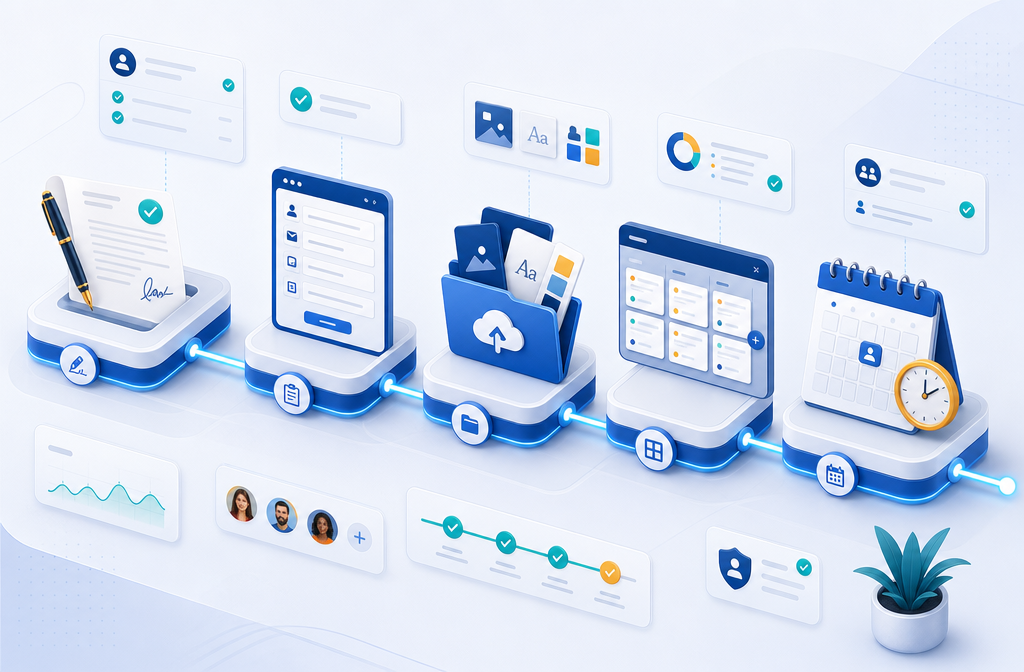
Client onboarding automation is a single connected workflow that starts when a deal is marked "closed" and then executes a standardized sequence: intake form, asset collection, access provisioning, project task creation, and kickoff scheduling, all without manual chasing.[1] Instead of sending welcome emails by hand, copying client info into three tools, and hoping nothing slips, automation triggers each step from the last.
For an agency owner, the practical shift is this: you stop being the bottleneck. The system sends the welcome email, collects the brand assets, creates the project in your management tool, and books the kickoff call, while you focus on the actual work you were hired to do. This sits at the heart of The 2026 Agency Guide to Automation because it touches almost every other system you run.
Why Do Agencies Need Automated Onboarding Workflows?
Agencies need automated onboarding because the sales-to-delivery handoff is the single most common failure point between closing a client and delivering work. When that handoff is manual, things get dropped: missing logins, vague scope, late kickoffs, confused clients.
Three concrete reasons it matters:
- Client experience. A new client who gets an instant, organized welcome trusts you more than one who waits four days for a "let me circle back" email.
- Cash flow. Faster onboarding means faster project start, which means faster invoicing.
- Owner time. Most small agency owners report onboarding as one of the top three time drains in their week.
Quick example: A three-person social media agency that onboards four clients a month spends roughly 6 to 10 hours per client onboarding manually. Automating the repeatable 70% reclaims a full work week each month.
Can Client Onboarding Automation Really Save Me Time?
Yes, and the savings compound. A practical rule: if your onboarding touches more than three tools and you sign more than one client per month, automation will pay back within 60 days.
Where the time actually disappears:
- Copy-pasting client info between CRM, project tool, and email
- Chasing assets (logos, logins, brand guides)
- Manually creating project folders, channels, and tasks
- Scheduling kickoff calls across time zones
- Sending reminder emails when clients go quiet
Automation handles each of these with triggers. Payment received triggers the welcome email and intake form. Form submission triggers asset upload reminders and CRM record creation.
What Are the Core Steps in an Automated Onboarding Workflow?
Most agencies should map onboarding into 6 to 8 repeatable steps, then attach automation triggers to each transition.[2]
A solid baseline sequence:
- Deal marked "closed-won" in CRM
- Contract and invoice sent automatically
- Payment received triggers welcome email and intake form
- Intake form submission creates client record and project
- Asset collection request sent with deadline
- Access provisioning (shared drive, Slack channel, project tool)
- Kickoff call booked via calendar link
- Internal team notified with project brief
The key principle: each step's completion becomes the next step's trigger. No to-do lists, no manual checkpoints.
Which Client Onboarding Tools Work Best for Marketing Agencies?
The best tools for marketing agencies fall into three categories: all-in-one client portals (Dubsado, HoneyBook, Bonsai), CRM-plus-automation stacks (HubSpot or Pipedrive connected via Zapier or Make), and dedicated onboarding platforms (Rocketlane, GuideCX, Content Snare).
| Tool Type | Best For | Typical Cost |
|---|---|---|
| Dubsado / HoneyBook | Solo and small agencies, creative services | $20-$50/month |
| Content Snare | Asset and content collection | $29-$99/month |
| Rocketlane / GuideCX | Larger agencies, complex client projects | $19-$49/user/month |
| Monday or ClickUp + Zapier | Agencies already using these PM tools | $30-$200/month combined |
| Leadsie | Agencies needing client account access (Meta, Google) | $25-$100/month |
For most small agencies, start with one all-in-one tool rather than stitching five apps together.
What Are the Top 3 Client Onboarding Platforms for Agencies?
The three platforms most consistently recommended for agency client onboarding in 2026 are Dubsado, Rocketlane, and Content Snare, each serving a different agency size and need.
- Dubsado. Best for solo operators and agencies under five people. Handles contracts, invoicing, forms, and email automation in one place. Lower cost, gentler learning curve.
- Rocketlane. Best for agencies onboarding mid-market or enterprise clients with multi-week project ramps. Strong on client-facing portals and status visibility.
- Content Snare. Best as a bolt-on for any agency that struggles with chasing assets. Automated reminders and a clean client upload experience.
Choose Dubsado if you want everything in one place. Choose Rocketlane if clients expect a polished portal. Choose Content Snare if asset collection is your biggest bottleneck.
How Much Does Client Onboarding Software Cost?
Client onboarding software for agencies typically costs $30 to $300 per month, depending on stack complexity, team size, and whether you bundle it with project management.
Realistic budget ranges:
- Solo agency: $30 to $80/month (Dubsado or HoneyBook alone)
- 2 to 5 person agency: $80 to $200/month (CRM + onboarding tool + Zapier)
- 6 to 15 person agency: $200 to $600/month (dedicated platform + integrations)
Add a one-time setup cost. If you build it yourself, plan 8 to 20 hours. If you hire a consultant, expect $1,500 to $5,000 for a fully built workflow.

What Features Should I Look for in Client Onboarding Software?
Look for trigger-based automation, CRM integration, custom intake forms, contract and e-signature support, client-facing portals, and reliable webhook or Zapier connectivity.
The non-negotiables:
- Conditional logic on forms. Different services should ask different questions.
- Native integrations with your CRM and project tool. Avoid platforms that need a paid integrator for basic syncs.
- Client portal or shared workspace. Clients should see status without emailing you.
- Notifications when something stalls. A 48-hour silence on an intake form should ping you, not disappear.
Skip anything that locks your data, charges per client onboarded, or lacks a real audit trail.
How Do I Integrate Client Onboarding Automation With My Existing CRM?
Integrate onboarding automation with your CRM by using the CRM's deal-stage change as the primary trigger, then connecting downstream actions through native integrations or middleware like Zapier or Make.
A typical setup:
- Deal moves to "closed-won" in HubSpot, Pipedrive, or your CRM.
- Webhook or native integration fires.
- Zapier or Make creates the project in ClickUp, sends the welcome email via your ESP, and triggers the intake form.
- Intake form data flows back to update the CRM contact record.
Common mistake: Building the automation outside the CRM so client data lives in two places. Always make the CRM the source of truth and let other tools read from it.
Is Client Onboarding Automation Good for Small Agencies or Just Enterprise?
Client onboarding automation is arguably more valuable for small agencies than enterprises, because small teams have no buffer when the owner is stuck in admin work.
Enterprise teams have onboarding specialists. Small agencies have the founder doing five jobs. Automating onboarding gives a solo or small team the operational backbone of a much larger company, without the headcount.
Choose to automate now if you onboard two or more clients per month and feel onboarding eating into delivery time. Wait if you onboard fewer than one client per quarter and your process is genuinely different every time.
How Complex Is It to Set Up Client Onboarding Automation?
Setting up a basic onboarding automation takes a focused weekend for a non-technical agency owner using an all-in-one tool like Dubsado or HoneyBook. A multi-tool stack with Zapier connections takes one to three weeks of part-time work.
The complexity is not in the tools, it's in defining your process. Most agencies fail because they try to automate a process they've never written down. Write the steps first. Automate second.
What Are Common Mistakes Agencies Make With Client Onboarding?
The most common mistakes are automating a broken process, skipping the human touch entirely, and building zero error handling.[1][7]
Top mistakes to avoid:
- Automating before documenting the manual process
- Removing all personal contact (clients still want a real welcome call)
- No fallback when a client doesn't fill out the form
- Hardcoding client names or services into templates
- Treating every client the same when service tiers differ
- Forgetting to test the workflow end-to-end before going live
What Happens If the Automation Breaks During Client Intake?
When automation breaks, the worst outcome is silent failure: a client who never gets the welcome email and assumes you're disorganized. Build for breakage from day one.
Three defenses:
- Status gates. Each step writes a status update somewhere visible (a Slack channel, a dashboard).
- Stall alerts. If a step hasn't completed within X hours, you get notified.
- Manual fallback. A simple checklist that lets you complete onboarding by hand if the system fails.
Test the full workflow with a fake client every quarter. It takes 30 minutes and catches most issues.
Which Industries Benefit Most From Client Onboarding Tools?
Marketing agencies, design studios, web development shops, accounting firms, legal practices, and consulting agencies benefit most, because all share repeatable intake patterns with high asset and information requirements.
Marketing agencies in particular benefit because of recurring access provisioning (ad accounts, analytics, social profiles) that's tedious manually but trivial to automate with tools like Leadsie.
FAQ
How long does it take to automate client onboarding? A basic automation takes a weekend. A polished, multi-tool stack takes one to three weeks.
Do I need to know how to code? No. Modern tools like Dubsado, HoneyBook, and Zapier are no-code.
Will clients notice the automation? They should notice the speed and organization, not the automation itself. Keep the tone personal.
What's the cheapest way to start? Pick one all-in-one tool like Dubsado or HoneyBook for $20 to $50 per month.
Can I automate onboarding for different service tiers? Yes. Use conditional logic in your intake form to branch the workflow by service type.
Do I still need a kickoff call? Yes. Automation handles the admin so the kickoff call can focus on strategy.
What if a client refuses to use a portal? Build an email-only fallback path. Not every client wants new logins.
How often should I review the workflow? Quarterly. Processes shift, and stale automations create silent friction.
Conclusion
Client onboarding automation for agencies is the highest-leverage system you can build in 2026. Start with the sales-to-delivery handoff, map your existing process into six to eight steps, then pick one tool that matches your size and budget.
Your next steps this week:
- Write down every step of your current onboarding on paper.
- Identify the three most repetitive steps.
- Pick one tool (Dubsado, HoneyBook, or your CRM plus Zapier) and automate just those three.
- Test with a fake client.
- Roll it out on your next real client and refine.
You don't need a perfect system. You need a working one that saves you five hours this month, then ten the next.